This guide describes how you account for your revenue and payouts using the Proforma platform invoice report.
This page covers:
Accounting for revenue
Accounting for fees
Accounting for payouts
The guide is based on the following accounting accounts:
Account no. | VAT code | Name | Description |
1012 | U25 | Sale of goods/services in Bookli (turnover) – income | All turnover is recorded here. This can be distributed across multiple accounts if desired. |
1050 | U25 | Bookli service fee (booking fee) – income | All booking fees collected by Bookli from end users are recorded here. |
1315 | I25 | Bookli service fee (booking fee) – expense (direct cost) | This is the counter-entry for the booking fee. The booking fee is collected by you, and you are then invoiced by Bookli, so the end customer only deals with you for VAT purposes. This is considered a direct cost and therefore has a separate accounting account. |
3605 | I25 | Bookli booking system – expense | Other costs for Bookli are recorded here. This includes payment fees, info screens, access control, SMS messages, etc. |
5610 | Bookli unpaid invoices (receivables clearing account) | This account serves as an intermediate station between the sale/invoice and the actual payment. There may be a delay in some payments, for example with split payments. | |
5810 | Bank | Your bank account | |
5830 | Bookli balance account (Adyen) | This is a holding account, which is the accounting counterpart to the balance account that you can see in Bookli under Finance → Payouts. | |
6950 | U25 | Points/gift cards (Bookli) | This is a holding account that contains all the points on your customers' point accounts. They are treated as gift cards, and VAT must therefore be settled at the time of purchase. |
The above list is merely a guide and intended as an example, based on a standard chart of accounts in e-conomic. You will need to create most accounts yourself to keep Bookli separate from other revenue.
In principle, we have two different accounting methods we can use, which are very similar to each other. We recommend option 1, as it provides the most flexibility. Option 2 works best if you only post manually once a month and do not have many unpaid invoices (i.e., invoices that are not paid on the same day they are issued).
In the accounting example below, we will use option 1.
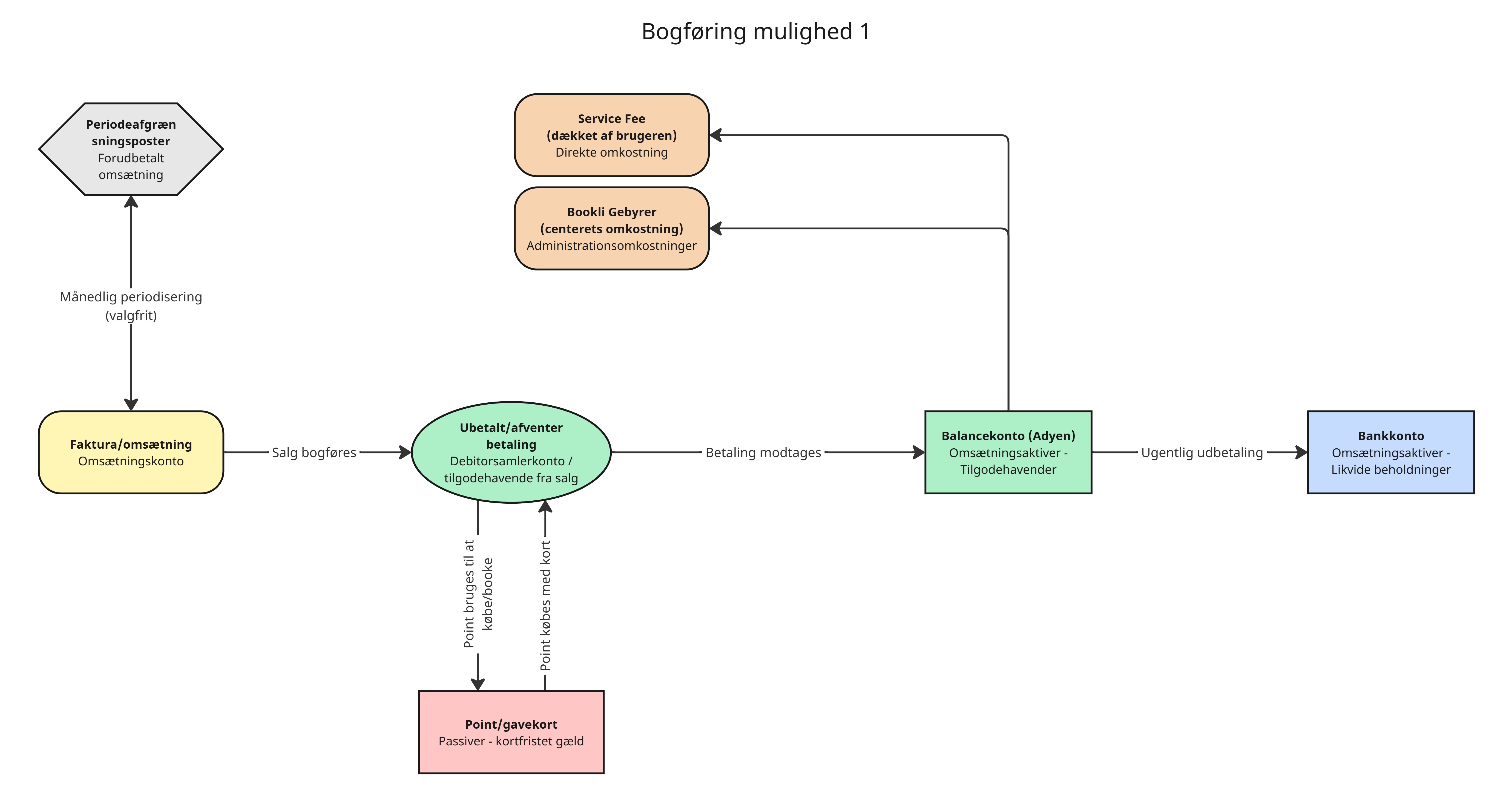
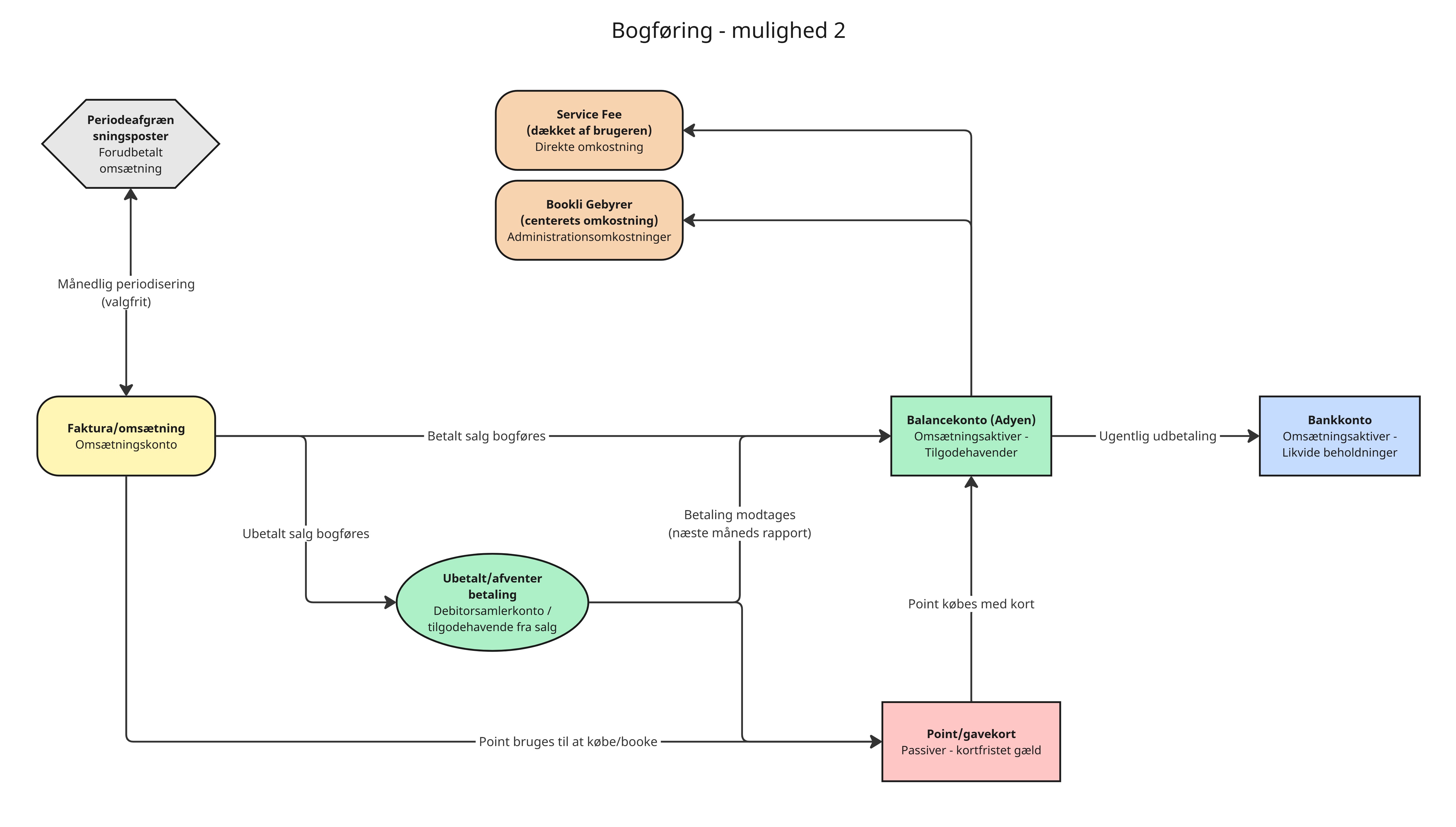
Now we will walk through the accounting process from "option 1" above. Further down the page you can find a "platform invoice report" where the figures we use here are marked.
Start by retrieving the Proforma platform invoice for the relevant period.
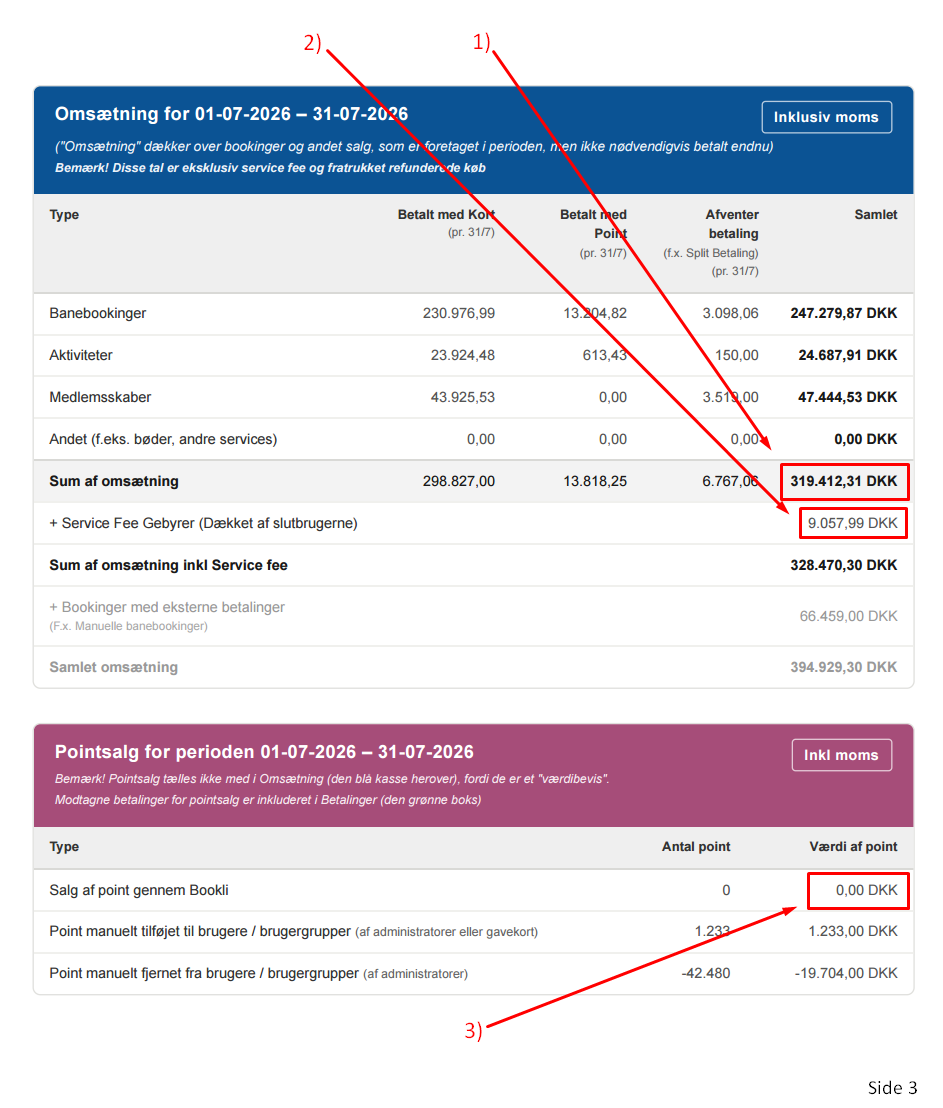
Find "Sum of revenue" on page 3 in the report, in the blue box.
Post this to account 1012 (sale of goods/services in Bookli) with 5610 (Bookli unpaid invoices) as the counter account.
Here you can also choose to exclude points if you do not wish to count points at a 1-1 value (i.e., 1 point has an accounting value of 1 kr., and this applies to all points). Then points should simply be posted separately at the accounting value in kroner. You can find this by retrieving the points report.
Find "Service Fee Charges (covered by end users)" on page 3 in the report, in the blue box.
Post this to account 1050 (Bookli service fee) with 5610 (Bookli unpaid invoices) as the counter account.
Find "Sale of points through Bookli" on page 3 in the report, in the purple box, and use the figure in the "value of points" column.
Post this to account 6950 (Points/gift cards) with 5610 (Bookli unpaid invoices) as the counter account.
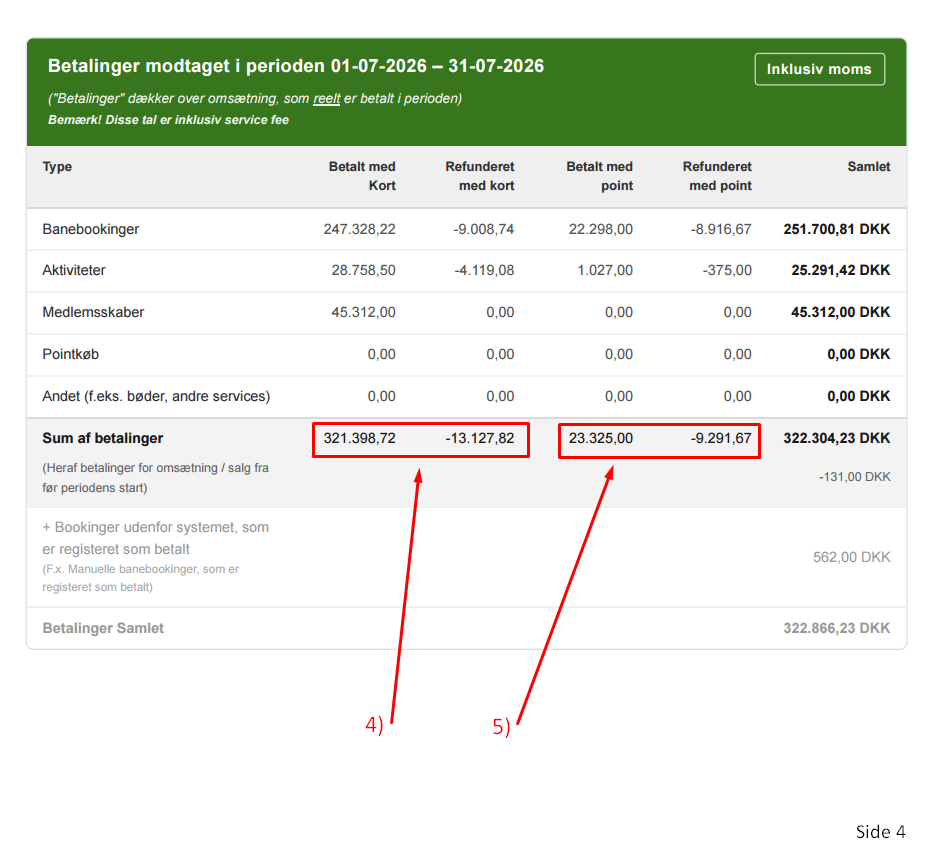
Find "Sum of payments" on page 4 in the report, in the green box.
Take the figures from the columns "Paid by card" and "Refunded by card" and add them together.
Post this to account 5610 (Bookli unpaid invoices) with 5830 (Bookli balance account) as the counter account.
Find "Sum of payments" on page 4 in the report, in the green box.
Take the numbers from the columns "Paid with points" and "Refunded with points" and add them together.
Book this on account 5610 (Bookli unpaid invoices) with 6950 (Points/gift cards) as the counter account.
Here you can also choose to use a different number if you do not wish to calculate points at a 1-1 value (i.e., 1 point has an accounting value of 1 kr., and this applies to all points). Then you simply replace the number you book above with the accounting value in kroner. You can find this by retrieving the points report.
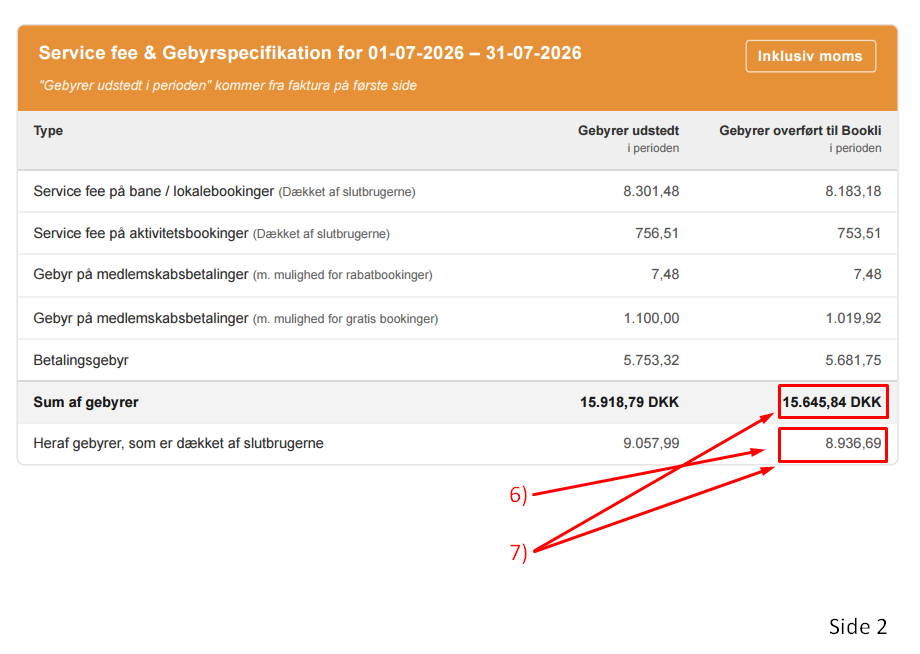
Find the column "Fees transferred to Bookli in the period" on page 2 in the report, in the orange box, and find the figure "Of which fees covered by end users".
Book this on account 5830 (Bookli balance account) with 1315 (Bookli service fee) as the counter account.
Find the column "Fees transferred to Bookli in the period" on page 2 in the report, in the orange box.
Subtract "Of which fees covered by end users" from "Sum of fees".
Post this to account 5830 (Bookli balance account) with 3605 (Bookli booking system) as the counter account.
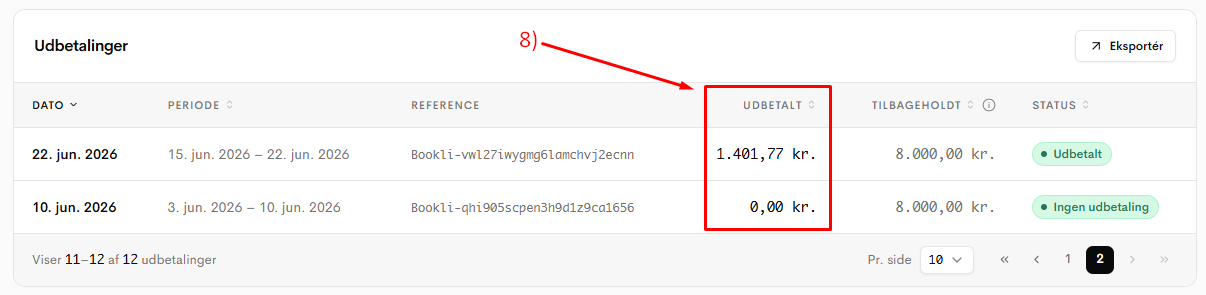
Go into Bookli and find the payout overview.
Each payout that has been processed in the period must be posted to account 5830 (Bookli balance account) with 5810 (Bank) as the counter account.
Below is an example from the relevant pages in the report, with references to the points above for the various figures used in the example.