This guide shows you how to reconcile your balance account in Bookli for a month based on invoice date (booking/invoice date). You will use three sources: the reconciliation report from Bookli, the platform invoice for the period, and the payout overview.
The purpose is to prove that the movement in the balance account during the period corresponds to the card payments you received, less the fees transferred to Bookli and the payouts sent to your bank account.
The reconciliation can be set up as one simple calculation:
+ Card payments (including refunds)
− Fees transferred to Bookli
− Payouts to the bank account
= Movement in the balance account during the period
The result is compared with Transactions in period (Invoice date) in the reconciliation report.
All figures in this guide are examples. Your own figures will look different.
You will need the following for the month you are reconciling (e.g. 01-08 – 31-08):
Source (click to go to the page) | What you need from it |
The balance statement at the top (Transactions in period) | |
The green box (Payments) and the orange box (Fees transferred to Bookli) | |
All payouts to the bank account during the period |
At the top of the reconciliation report, there are two columns in the balance statement:
Column | Meaning |
Invoice date | The theoretical balance, as if all transactions were settled on their booking/invoice date. Opening + transactions during the period = closing. |
Settled (value date) | The actual balance with the payment provider. Card payments and refunds typically settle T+2 banking days after the booking date, while transfers and payouts settle the same day. |
In this guide, we use Invoice date, because the platform invoice is also calculated based on the booking/invoice date. This means you compare figures calculated in the same way and avoid discrepancies caused by bank processing days for card payments around the end of the month.
Generate the reconciliation report for the period. You will find the balance summary at the top. Note the figure in the Transactions in period row in the Invoice date column. This is the figure you need to reconcile against.
Example:
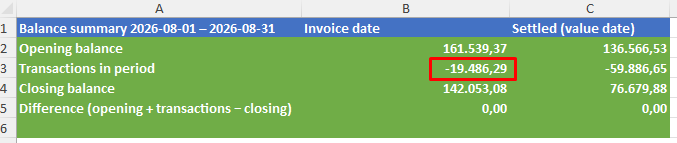
Check that Difference is 0.00. If it is not, the report has not been generated correctly, and you should generate it again before continuing.
Open the platform invoice (PDF) for the period and go to the page Payments received during the period (the green box). In the Total payments row, you will find:
Paid by card
Refunded by card
Add the two numbers together.
Example:
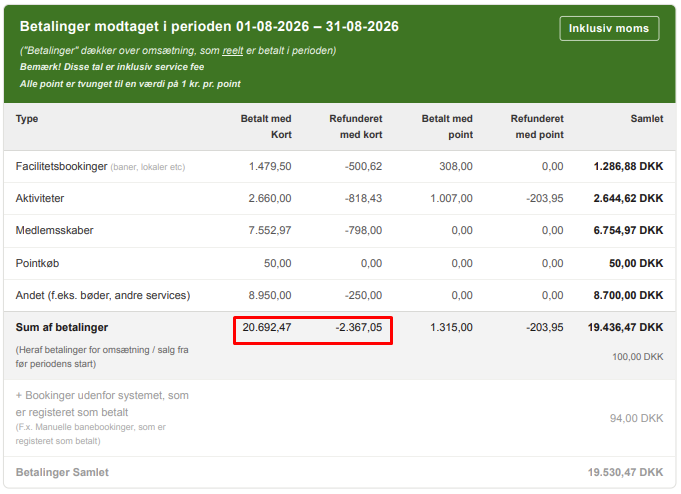
⚠ Use only the card columns. Payments and refunds made with points should not be included, because points are not money moving through the balance account. The same applies to Bookings outside the system that are registered as paid (e.g. manual court bookings). They were not paid through Bookli.
Go to the Service fee & Fee specification page (the orange box). Find the row Total fees in the column Fees transferred to Bookli during the period.
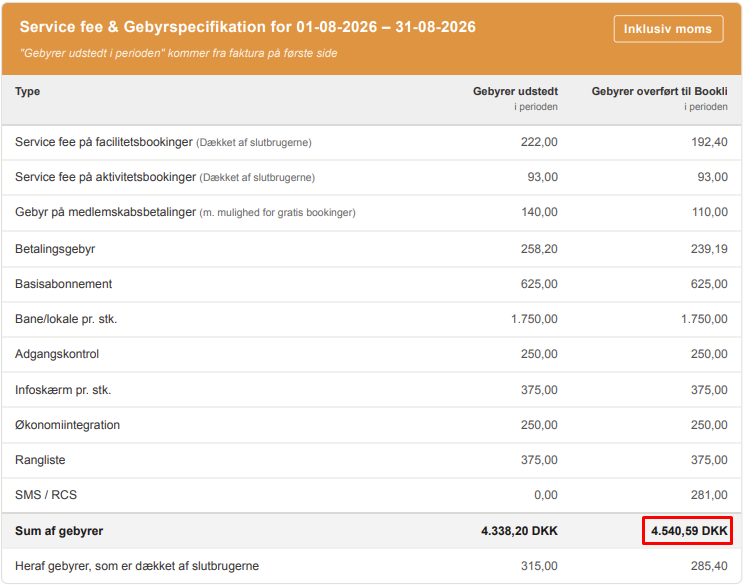
⚠ Use the "Fees transferred to Bookli" column, not "Fees issued". Some fees (e.g. court/venue fees per item and access control) are invoiced but not deducted from the balance account.
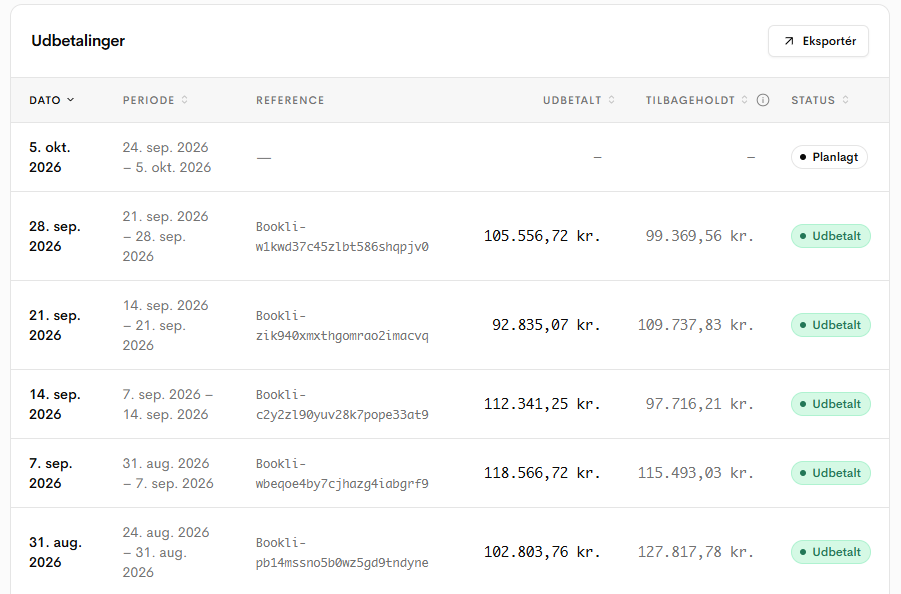
Find all payouts to your bank account during the period in the payout overview, and add them together.
Example:
Subtract fees and payouts from card payments:
Description | Amount |
+ Total card payments (step 2) | 350.324,45 |
- Fees transferred to Bookli (step 3) | -17.342,18 |
- Total payouts (step 4) | -345.103,00 |
Calculated movement in the balance account | -12.120,73 |
Then compare with Transactions in period (Invoice date) from step 1:
Description | Amount |
Calculated movement on the balance sheet account | -12.120,73 |
Transactions in period (Invoice date) | -12.188,41 |
Difference | 67,68 |
If the difference is 0.00, the balance account is reconciled. Small discrepancies may occur due to, for example, rounding errors and, in some cases, also if fees for a card payment are mistakenly posted a few days later. We are actively improving our handling of these “minor” entries so that the reports you download become more accurate over time.
A small difference is normal and is typically due to the platform invoice and reconciliation report not placing exactly the same transactions in the period. This most often happens around the end of the month.
Typical causes:
Reason | Explanation |
Timing differences at month-end | A payment or refund made late on the last day of the month may be recorded in different periods in the two sources, for example due to time zones or delays in the payment network. |
Refunds | A refund may have been created in one period in Bookli and processed in another period in the balance account. However, this is very rare and is due to delays in responses from the end customer's bank. |
Payments from before the start of the period | The platform invoice shows how much of the payments relates to revenue from before the start of the period. This can affect which payments are included in the period. |
Manual transfers | can occur if manual adjustments are made by Bookli support, but only in isolated cases. |
Find Transactions in period (Invoice date) in the reconciliation report.
Find paid by card + refunded by card in the green box in the platform invoice.
Find Fees transferred to Bookli in the orange box in the platform invoice.
Find the sum of payouts during the period in the payout overview.
Calculate: card payments − fees transferred to Bookli − payouts.
Compare the result with Transactions in period (Invoice date), and investigate any difference.