The Unpaid invoices report shows all purchases in Bookli that were not fully paid as of a specific date: court bookings, activities, memberships, and other sales. These are your receivables (debtors) in Bookli as of that date.
The report is typically used for two things:
Reconciliation of the debtor account at month-end and year-end. See the guide Reconciliation of unpaid invoices (debtors).
Following up with customers who owe money, e.g. members whose card payment has failed.
All figures in this article are examples. Your figures will look different.
Go to Economy → Reports and click Download report next to Unpaid invoices.
Select a date. You can choose the shortcuts End of last month or Today, or set any date. The date cannot be in the future.
Click Generate report. The report opens as a PDF, and you can copy a link to it.
The report covers the entire company (all locations).
Concept | What does it cover? |
|---|---|
As of date | The report shows the position at the end of the day (Danish time). If you select today, it shows the position right now. |
The report has two parts:
The blue box at the top: a summary broken down by types of sales.
The details: one line per unpaid invoice, which together add up to the figures in the box.
At the top of the page, you will find the club's name and address, the date the report is run as of, and when it was generated.
An example of the blue box:
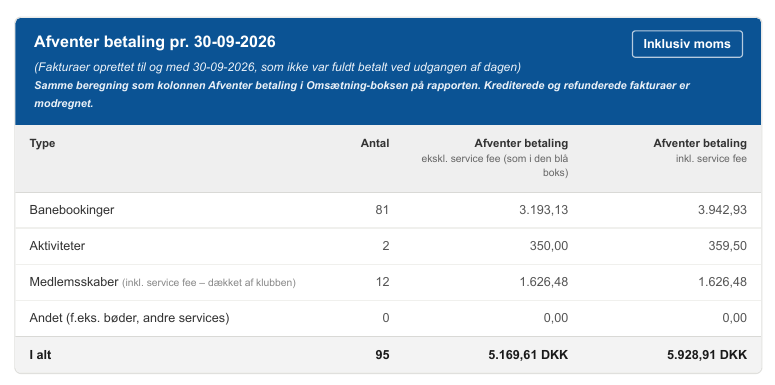
The box shows what customers collectively owed at the end of the date. The calculation is the same as the Awaiting payment column in the blue Revenue box in the platform invoice. The difference is that the platform invoice only looks at purchases created in one period, whereas this report looks at all purchases up to and including the date, regardless of when they were created.
The figures are inclusive of VAT, and credited and refunded invoices have been offset.
Concept | What does it cover? |
|---|---|
Type | Court bookings, Activities, Memberships and Other (e.g. fines and other services). |
Count | Number of unpaid invoices of this type. |
Pending payment excluding service fee (as in the blue box) | The outstanding amount excluding the service fee. Calculated exactly like the Pending payment column in the blue box on the platform invoice, so the two can be compared. |
Pending payment including service fee | The amount customers actually still owe, including the service fee. |
Total | The sum of all types. |
ℹ Memberships: For memberships, the service fee is part of the price and is covered by the club, not the customer. Therefore, the two columns are identical for memberships, as in the blue box on the platform invoice.
Example: As of 30-09-2026, the club has 95 unpaid invoices. Customers owe DKK 5,169.61 excluding the service fee and DKK 5,928.91 including the service fee. Most are court bookings (81), typically split payments where not all participants have paid.
Rule | What does this mean? |
|---|---|
Created on or before the date | Only invoices created on or before the date are included. |
Not fully paid by the end of the date | Payments received after the date do not change the amount, but are shown in the Payment date column in the specification. |
Credit notes and refunds | A credit note or refund created on or before the date is offset against the invoice it relates to. An invoice that is fully credited is therefore not included. |
Less than DKK 1 | An invoice with an outstanding balance of DKK 1 or less (including service fee) is considered paid and is not included. This accounts for minor rounding differences. |
Paid outside Bookli | Invoices registered as paid or unpaid outside the system (e.g. invoiced through your own accounting system) are not included. You manage those in your own system. |
Point purchases | Point purchases are not included. This is equivalent to the blue box on the platform invoice also not having a row for point purchases. |
Cancelled purchases | A booking or activity that was cancelled on the date, and for which nothing was ever paid, is a cancelled purchase (e.g. an expired reservation), not a debt. It is not included. |
Cancelled after the date | An invoice that is only cancelled or credited after the date is still included because it was unpaid on that date. The credit date is shown as the Payment date. |
Purchases only | Only positive invoices (purchases) can be unpaid. Credit notes and refunds never appear on their own line. |
⚠ The report is a snapshot as of the specified date. If you run the report for a date in the past, you’ll see the status as it was on that day. The amounts do not change, even if the customer has paid since then. This makes it possible to reconcile a completed month, even if the report is only run later.
An example of the specification:

The specification shows each unpaid invoice, sorted by purchase date with the oldest first. All amounts include VAT.
Concept | What does it cover? |
|---|---|
ID | ID of the item purchased: the booking, activity, membership or, if the purchase does not have its own page, the customer. Click the ID to open it in Bookli. You must be logged in to the correct location before clicking. |
Purchased | Date and time of purchase (invoice creation). |
Type | Court booking, Activity, Membership or Other. |
Customer's email address. | |
Total price excluding service fee | Invoice amount excluding service fee. For memberships, the service fee is part of the price. |
Service fee | Service fee on the invoice. Total price excluding service fee + service fee = the amount charged to the customer. |
Still unpaid incl. service fee | What the customer still owed at the end of the date, including the service fee. If the amount is less than the total price + service fee, the invoice is partially paid (typically a split payment). |
Payment date | The day the invoice was subsequently fully paid or credited. The field is empty if the invoice is still unpaid. |
Example of a partially paid booking: A court booking has a total price of 19.80 excluding the service fee and 12.20 in service fees, for a total of 32.00. The customer still owes 12.00. This means that the booking owner has paid their share, but one participant in the split payment has yet to pay.
Example of an invoice that has since been paid: A membership purchased on 25-09-2026 was unpaid as of 30-09-2026 (the card payment failed), but was paid on 07-10-2026. The invoice is included in the report as of 30-09, and Payment date shows 07-10-2026.
The Payment date column makes it easy to distinguish between two types of unpaid invoices:
Payment date is filled in: The invoice was unpaid on the date, but has since been paid or credited. It should be included in the reconciliation as of that date, but requires no follow-up.
Payment date is blank: The invoice is still unpaid. Consider whether the customer should be sent a reminder or whether the invoice should be credited (e.g. a membership that was never paid for and has been cancelled).
Tip: If you credit an invoice in Bookli, it disappears from reports generated as of a date after the credit. In reports as of a date before the credit, it still appears, with the credit date as the Payment date.
Why is an invoice included even though the customer has paid? Because the payment was received after the selected date. See the Payment date column. Run the report as of today to see the current status.
Which column should I use in my accounts? Use excluding service fee, if your revenue is recorded based on the four revenue lines in the blue box on the platform invoice (they exclude the service fee). Use including service fee, if you record "Total revenue including service fee" and the service fee to Bookli as an expense, or when you need to know how much a customer actually still owes. See the guide Reconciling unpaid invoices (accounts receivable).
Why aren't my own invoices from the accounting system included? Bookings registered as paid or unpaid outside Bookli are excluded from the report. Reconcile those in your own system.