The platform invoice shows your finances in Bookli for a period: what has been sold, what has been paid, and what Bookli has deducted in service fees, charges and other fixed costs.
It comes in two versions with the same structure.
The proforma invoice you retrieve yourself in Bookli for the period you choose.
It is preliminary — use it to keep track and reconcile as you go.
The monthly invoice is sent by email after the month ends, covers the entire month and is final. This is the one your accounting department needs.
The figures may therefore differ slightly between the two if payments or refunds have been received after you retrieved the proforma invoice.
Note: Neither of the two invoices is a charge.
The amounts have already been settled on an ongoing basis — the invoice is solely a specification of fees and costs so you can reconcile and post entries.
It is sent by default to the main email address of the club / location (entered all the way back from creation on Bookli)
Would you like it sent to a different address?
Then you simply write to [email protected] with the email address the invoice should go to.
Then we will set it up for you.
In connection with the transition to Adyen as payment infrastructure partner, Bookli has switched to a new internal accounting system.
This enables more precise financial management across the platform as well as a range of new features.
This means that all transactions completed after the club's transition to Adyen will not appear in the old proforma invoice.
Instead, they will appear in the new proforma platform invoice
The new platform invoices:
Can be found here: https://bookli.app/c/economy/reports.
The old Stripe platform invoices:
Can be found here: "Settings" → "Platform invoices (for former Stripe customers only)"
https://bookli.app/c/settings/platform-invoices
Further down in the article you will find a description of each line on the invoice.
But first it is important to understand the concept, which fundamentally distinguishes the new system from the old one.
In Bookli we distinguish between invoices and payments as two separate things.
Invoice: When a customer makes a booking, we generate an invoice.
Payment: When the customer then completes the payment, we generate a payment, which is linked to the invoice.
This approach is similar to the way most people already work in their own accounting systems, and aligns well with applicable accounting and VAT regulations.
At the same time, it provides greater flexibility with regard to new features in Bookli.
However, this also means that payments do not necessarily take place on the same date as the invoice was generated.
For example, with "split payments between participants" on a booking, this will not be the case, as the amount for the booking is only reserved until two hours after the booking is completed.
The same also applies if a customer's card / bank rejects the payment for a membership renewal.
The above concept regarding invoice vs payment is used, for example, in the platform invoice, which is always calculated over a period.
On pages 3 and 4, all revenue (all invoices) and payments in the period are listed in separate boxes.
The difference lies in:
Revenue | "Revenue" covers bookings and other sales made during the period, but not necessarily paid yet. |
Payments | "Payments" covers revenue that actually has been paid during the period. |
Page 1 is an overview of service fees / charges / costs to Bookli in the period.
An example of an invoice page 1:
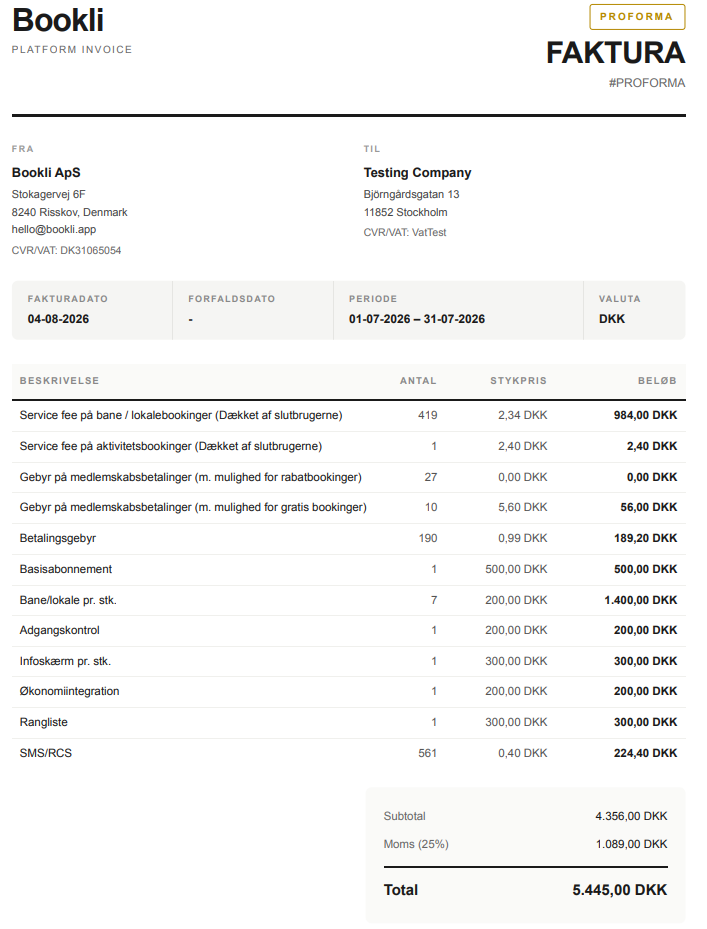
Description of what the different fields cover:
Concept | What does it cover |
Service fee on court/venue bookings | The total amount of service fees charged on court/venue bookings during the period. |
Service fee on activity bookings | The total amount of service fees charged on activity bookings during the period. |
Fee on membership payments (with discount booking option) | The total amount (and number) of fees charged on membership payments during the period. |
Fee on membership payments (with free booking option) | The total amount (and number) of fees charged on membership payments during the period. |
Payment fee | The total payment fee for all payments made during the period. |
Basic subscription | Base payment for using Bookli as a system |
Court/venue per unit | Payment per court/venue in use in Bookli |
Access control | Payment for access control features |
Info screen per unit | Payment per info screen in use via Bookli |
Financial integration | Payment for financial integration |
Ranking list | Payment for ranking list function |
SMS/RCS | Number of SMS sent during the period, and what they cost |
Page 2 is an extended overview of service fees / charges / costs to Bookli during the period.
It is split into two columns:
Fees issued during the period
Fees transferred to Bookli during the period
The purpose of this specification is:
To see the difference between which fees are issued on the invoice and how many of them have actually been collected (since we only deduct the fee when the end user's payment is finalized on the end user's card).
An example of the orange service fee & fee specification box:
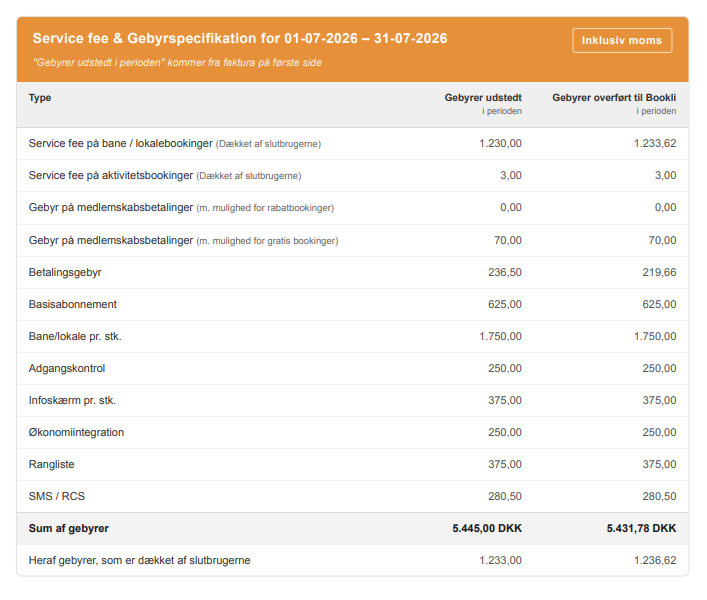
Description of what the different fields cover:
See table above for page 1 - the concepts are the same.
"Revenue" covers bookings and other sales made during the period, but not necessarily paid yet.
That is, all "invoices" Bookli issues during the period.
Note! These figures are exclusive of service fee and inclusive of VAT.
Example of the blue revenue box:
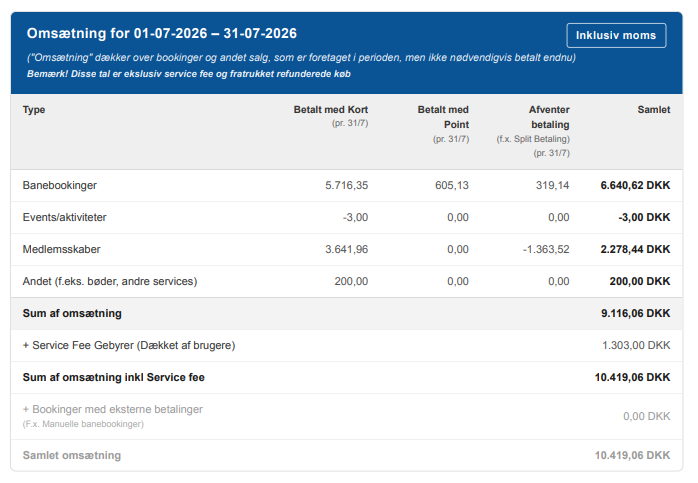

The three "payment columns" in the gray row are defined as follows:
Begreb | Hvad dækker det over? |
Betalt med kort | Hvad der er solgt og betalt med kort i perioden |
Betalt med point | Hvad der er solgt og betalt med point i perioden |
Afventer betaling | Hvad der er solgt i perioden, hvor betalingen “afventer “/ ikke er på plads endnu. |
The terms in the first column downward are defined as follows
Concept | What does it cover? |
Court/venue booking | The total revenue for the period relating to court/venue bookings. |
Activities | The total revenue for the period relating to activity bookings. |
Memberships | The total revenue for the period relating to memberships. |
Other(e.g. fines, other services) | The total revenue for the period that is not included in the lines above. |
Below are the different sum amounts in descending order
Sum of revenue | The total revenue for the above 4 categories. |
+ Service Fee Charges (Covered by users) | Bookli charges a service fee on all bookings. |
Sum of revenue incl. Service fee | The total revenue incl. service fee. |
+ Bookings with external payments | The sum of all bookings where payment is set to take place outside the system (outside Bookli). |
Total revenue | The total sum |
Points sales has its own box outside the blue revenue box, because points are a "certificate of value".
Sales of points are therefore not included in the blue revenue box.
Payments received for points sales are included in "Payments" (the green box on page 4).
An example of the purple points sales box:
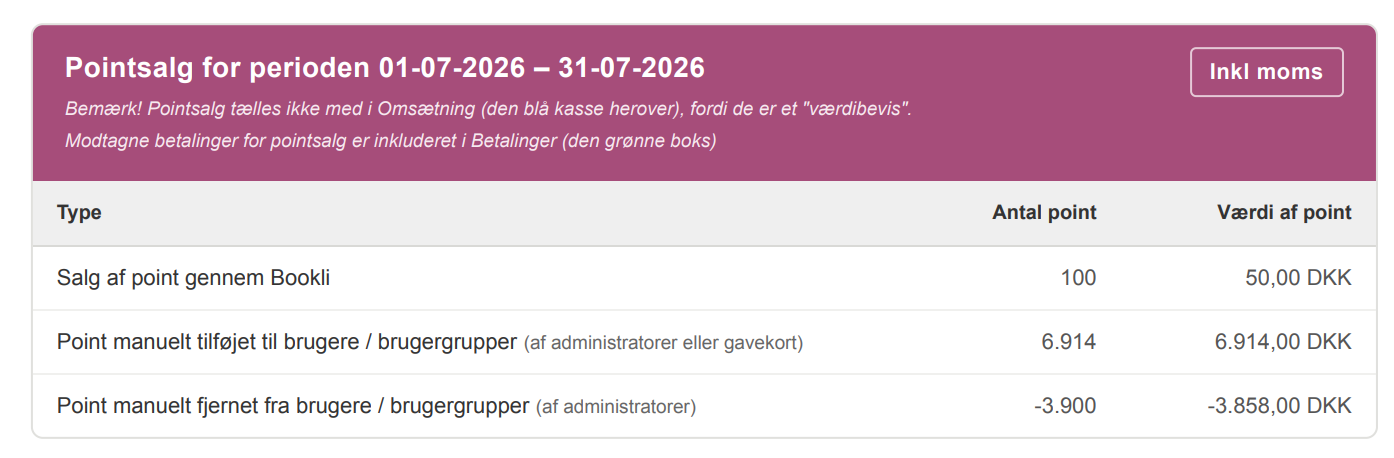
Concept | What does it cover? |
Sale of points through Bookli | The total revenue from the sale of points in the period |
Points manually added to users / user groups | Points manually added to users / user groups |
Points manually removed from users / user groups | Points manually removed from users / user groups |
"Payments" covers - as mentioned previously - revenue that has actually been paid in the period Note! These figures are inclusive of service fee and VAT.
An example of the green payments box:
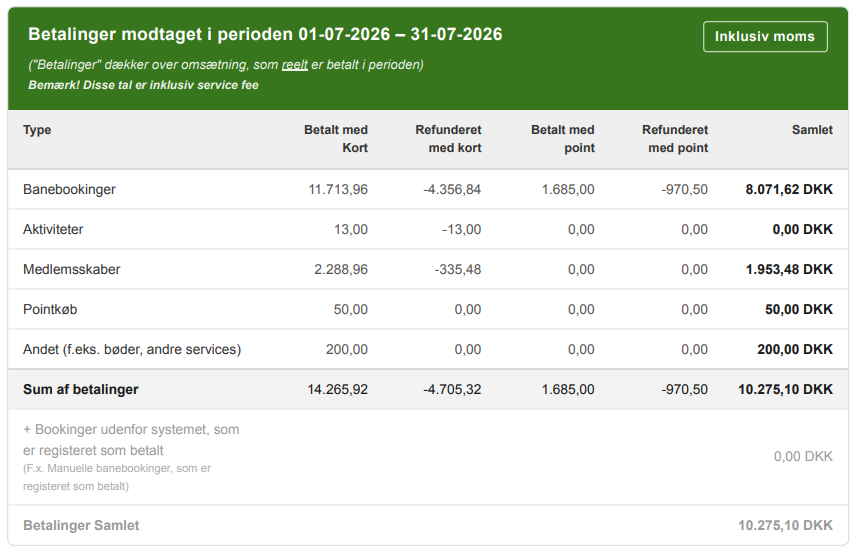
The four "payment columns" in the gray row cover:
Concept | What does it cover? |
Paid by card | Shows the sum of all payments made during the period paid by card |
Refunded by card | Shows the sum of all refunds made during the period paid out via card |
Paid by points | Shows the sum of all payments made during the period - paid by points |
Refunded by points | Shows the sum of all refunds made during the period paid out via points |
Note: Unlike page 3, refunds are shown in separate columns here.
The terms in the first column downwards are defined as follows
Court/venue booking | The sum of payments for the period relating to court/venue bookings. |
Activities | The sum of payments for the period relating to activity bookings. |
Memberships | The sum of payments for the period relating to memberships |
Point purchases | The sum of payments for the period relating to point purchases |
Other (e.g. fines, other services) | The sum of payments for the period that are not included in the above lines. |
Sum of payments | The sum of all payments |
+ Bookings outside the system that are registered as paid | The sum of all bookings where payment is set to take place outside the system (outside Bookli) and are marked as paid. |
Payments collected | The total sum |
The gray statistics box is for other key figures for the period.
An example of the gray statistics box:
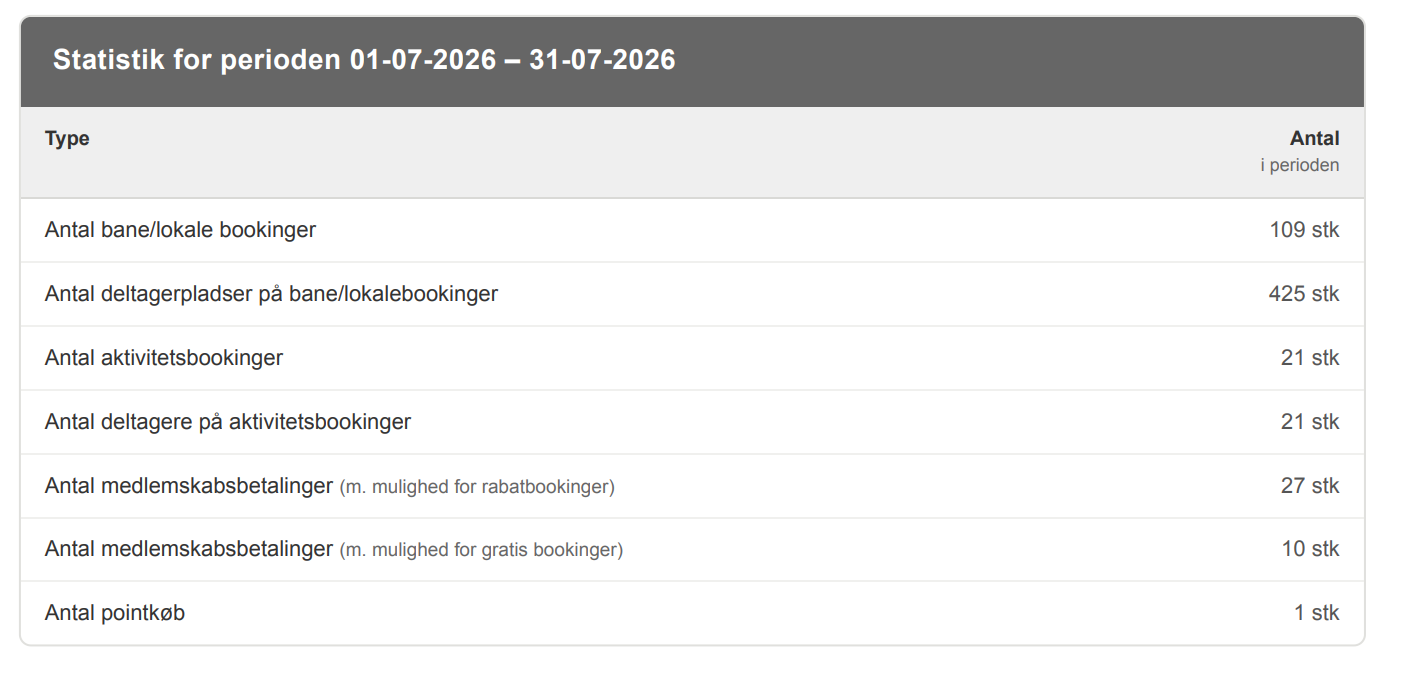
Concept | What does it cover |
Number of court/venue bookings | The total number of court/venue bookings made during the period. |
Number of participant spots on court/venue bookings | The total number of participant spots that were on the court/venue bookings made during the period. |
Number of activity bookings (number of participants) | The total number of activity bookings made during the period. |
Number of participants on activity bookings | The total number of participants who were on activity bookings made during the period Thisdoes not include registrations made by an admin. |
Number of membership payments (with discount booking option) | The total number of membership payments made during the period, where the membership provides less than 100% discount on all bookings. |
Number of membership payments (with free booking option) | The total number of membership payments made during the period, where the membership provides 100% discount on one or more parameters. |
Number of point purchases | The total number of point purchases during the period |
Med udbetalingerne fra Adyen henviser vi altid først og fremmest til afstemme med Udbetalingsoversigten på https://bookli.app/c/economy/payouts
Hvis man gerne vil sammenligne med platforma fakturaerne, skal man kigge på side 4 i den grønne boks omkring betalinger i perioden.
Det er dog svært at ramme det præcise tal, da der skal også skal tages hensyn til balancekontoen (de penge Adyen holder tilbage)
Men der kan laves følgende cirka udregning:
Summen af “betalt med kort”
Minus summen af “refunderet med kort”
Minus summen af månedlige gebyrer for Bookli
I kan læse mere om, hvordan Adyen Udbetalingerne regnes sammen her:
Udbetalingerne fra Bookli - hvordan virker det?