The accrual report shows what you have sold but not yet delivered as of a specific date: bookings and activities that customers have purchased and paid for in full or in part up to and including that date, but which will take place after that date.
In your accounts, this is money you have received for something you have not yet delivered. It is therefore not revenue earned yet, but an advance payment from customers (a deferred income item on the liabilities side). The report provides you with the figure for this entry, so your revenue is recorded in the month when the booking is actually fulfilled.
The report is typically used at month-end and year-end. How to reconcile using it is described in the guide Reconciling accruals (advance payments).
All figures in this article are examples. Your own figures will look different.
Go to Economy → Reports and click Download report next to Accrual report.
Select a date. You can choose the shortcuts End of last month or Today, or set any date. The date cannot be in the future.
Optionally select Force all points to have a value of DKK 1 per point (see the section on points below).
Click Generate report. The report opens as a PDF, and you can copy a link to it.
The report covers the entire company (all locations).
Term | What does it cover? |
|---|---|
As of date | The report shows the position at the end of the day (Danish time). If you select today, it shows the position right now. |
Force points to 1 DKK per point | Points are counted at 1 DKK per point instead of the value they were actually purchased for. Applies to this report only. |
The report has two parts:
The blue box at the top: a summary broken down by facilities and activities.
The specification: one line per booking, which together add up to the figures in the box.
At the top of the page you will find the club's name and address, the date the report was generated as of, and when it was generated.
An example of the blue box:
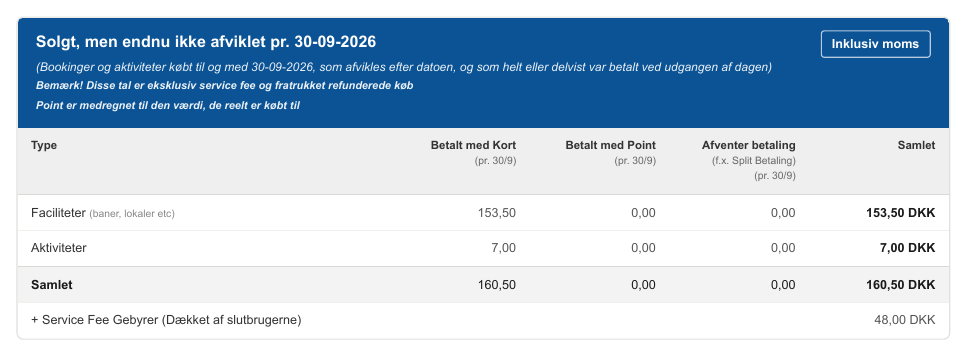
The box is calculated in the same way as the blue Revenue box on the platform invoice, but only for purchases that are settled after the date. The figures are:
VAT included
Excluding service fee (the service fee appears on its own line at the bottom)
Refunded purchases deducted (a refund is offset against the purchase it relates to)
Concept | What does it cover? |
|---|---|
Type | Facilities (courts, rooms, etc.) and Activities (events, training, camps, etc.). |
Paid by Card (as of date) | The portion of the price (excluding service fee) that had been paid by card by the end of the date. Payments made later are not included here. |
Paid with Points (as of date) | The portion of the price (excluding service fee) that had been paid with points by the end of the date. Points are included at the value they were actually purchased for (see below). |
Pending payment (e.g. split payment) | The portion of the price that had not yet been paid by the end of the date. Typically occurs with split payments, where the booking owner has paid their share, but not all participants have paid yet. |
Total | Paid by Card + Paid with Points + Pending payment. The columns always add up to Total. |
+ Service Fee Charges (covered by end users) | Service fee on the same purchases. The fee is added to the customer's price and subsequently charged by Bookli to the club, as described in the article Platform invoice. The line corresponds to "+ Service Fee Charges" in the blue box on the platform invoice. |
Example: As of 30-09-2026, the club has sold facilities for 153.50 and activities for 70.00, which will not take place until October. Everything has been paid by card, so Pending payment is 0.00. The total is DKK 223.50, and customers have also paid DKK 48.00 in service fees.
It is important to know the rules when you reconcile:
Rule | What does this mean? |
|---|---|
Facilities and activities only | Memberships, point purchases and “other” (fines, services) are not included. They are not accrued by default. |
Purchased on or before the date | Only purchases (invoices) created on or before the date are included. |
Takes place after the date | A facility booking takes place at the booking’s start time. An activity takes place on its first day. Therefore, an activity that has already started on the date is not included, even if it lasts several days. |
Fully or partially paid | Only purchases for which something (by card or points) had been paid by the end of the date. Purchases for which nothing has been paid belong in the Unpaid invoices report. |
Paid outside Bookli | Bookings recorded as paid outside the system (e.g. invoiced through your own accounting system) are not included. |
Cancellations | A booking that had been cancelled on the date is not included. A booking that is only cancelled after the date is still included, because on that date it was a paid, future booking. |
One line per booking | A facility booking appears on one line, with all purchases and refunds made for it up to the date offset against each other (e.g. adding participants or a partial refund). An activity appears on one line per purchase, with the associated credit notes. |
Purchases without a booking | A purchase that is not linked to a specific booking (e.g. a basket containing several bookings in one purchase or a standalone service) has no completion date and is therefore not included. |
An example of the specifications:

The specifications show each booking in the report, sorted by settlement date. All amounts include VAT.
Term | What does it cover? |
|---|---|
ID | ID of the booking (facility) or activity. Click the ID to open it in Bookli. You must be logged in to the correct location before clicking. |
Purchased | Date and time of purchase. If there are multiple purchases on the same booking, the first one is shown. |
Type | Facility or Activity. |
The buyer's email address. | |
Total price excluding service fee | The sum of all invoices and credit notes on the booking up to the date, excluding the service fee. Points are included at the value they were actually purchased for. |
Service fee | Service fee on the booking, added to the customer's price. |
Paid excluding service fee | The amount paid by card and points by the end of the date (excluding the service fee). Corresponds to Paid by Card + Paid by Points in the box. |
Not yet paid excluding service fee | Total price minus Paid. Corresponds to Awaiting payment in the box. |
Settlement date | The day the booking takes place. For an activity spanning multiple days, this is the first day. |
The sum of the lines’ Total price gives the box’s Total, and the sum of Service fee gives the box’s service fee line.
When a customer pays with points, the report counts the points at the value customers actually paid for them, not at 1 kr. per point. For example, if a customer buys 1,200 points for 1,000 kr. and uses 120 points on a booking, the booking is counted as 100 kr. in the Paid with Points column. This is the same rule as in the platform invoice, so the two reports can be compared.
If you turn on Force all points to have a value of 1 kr. per point, the points are instead counted at 1 kr. per point. Use the same setting as in your platform invoice so the figures match.
Why isn’t a booking paid for during the period included? Because it takes place on or before the date, or because it was paid for outside Bookli. Check the booking’s start time.
Why isn’t a membership included? Memberships, point purchases, and other sales are not part of the report. It covers facilities and activities only.
Can I pull the report for a date in the past? Yes. The report shows the position at the end of the selected day. However, note that bookings that have since been moved use their current settlement date.
Should I include the service fee in my accrual? It depends on how you book the revenue from the platform invoice. If you book the four revenue lines in the blue box (excluding the service fee), use Total. If you book "Total revenue including service fee", add the "+ Service Fee Charges" line. The important thing is to do the same for the accrual as for the revenue.